Surfshark Antivirus reviewed: what it is, what it covers, and what it cannot do
Surfshark’s malware scanner is not a standalone antivirus product and it does not run on every device you own. Here is a plain account of what it is, where it helps, where it does not, and which parts of the marketing we could not verify.
Advertising disclosure
This article contains paid partner links, marked “Partner link”. If you subscribe after following one, ASSURITY s.r.o. is paid a commission by the advertiser. You pay the same price you would pay going direct. Commission does not buy a favourable verdict: nobody outside this site reads or approves an article before publication, and the drawbacks below were not cleared with anyone. Our editorial policy sets out the rules we work to.
Most antivirus reviews read like a feature list with a star rating bolted on the end. This one tries to do something duller and more useful: explain the mechanism, separate the claims we could check from the claims we could not, and say clearly where a malware scanner stops being the right tool for the problem you actually have.
We are paid by commission when a reader subscribes through a partner link on this page. That is stated at the top, again here, and beside every button. It does not change the contents of this section, or of the one about the platforms this product does not support.
What Surfshark Antivirus actually is
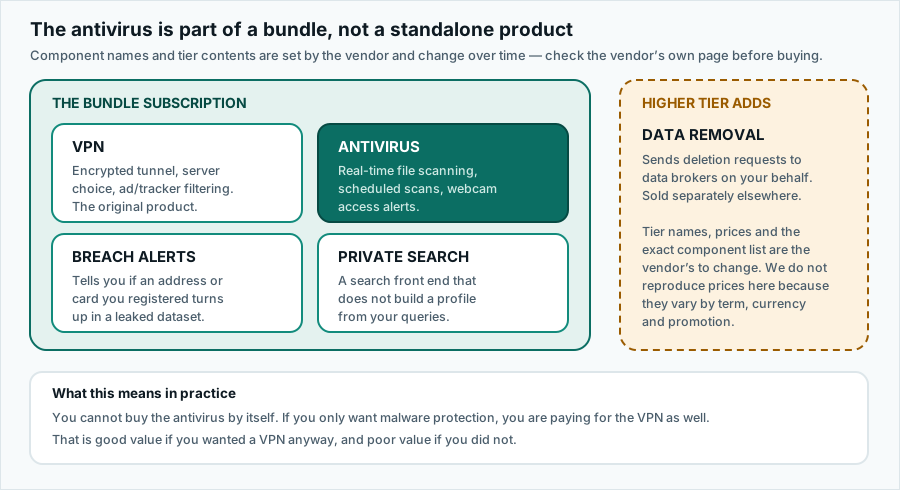
Surfshark began as a VPN provider and the VPN is still the centre of the business. The antivirus is a later addition, and at the time of writing it is not sold on its own. You get it by subscribing to one of Surfshark’s bundled plans — marketed as Surfshark One and a higher tier that adds a data-removal service — which package the VPN, the malware scanner, a breach-alert service and a private search front end into a single subscription.
This matters more than it sounds. If you were shopping for a malware scanner and nothing else, you are buying a VPN subscription with a scanner attached. Whether that is good value depends entirely on whether you wanted a VPN. If you did, the scanner is close to free. If you did not, you are paying for a component you will never open.
Surfshark itself has been part of Nord Security since the two merged in 2022, which is worth knowing mainly because it means the “independent challenger versus the big incumbents” framing you will see in a lot of coverage is no longer quite accurate.
Do you still need antivirus at all?
It is a fair question and the honest answer is: less than you used to, and it depends on the operating system. Every major platform now ships with meaningful built-in protection. Windows includes Microsoft Defender Antivirus, which has scored well in public laboratory testing over recent years. macOS combines Gatekeeper, notarisation checks and the XProtect signature system. Android runs Play Protect against apps installed from the Play Store and, increasingly, from outside it.
Against that baseline, a paid scanner is an incremental improvement rather than the difference between safe and doomed. Anyone selling it to you as the latter is overselling.
What still argues for one: you download a lot of software from outside curated stores; you share a machine with someone less cautious; you want scanning, a VPN and breach alerts managed from one place rather than four; or you simply want a second opinion running alongside the built-in tool.
A note on statistics
You will see figures quoted everywhere about what percentage of infections begin with a human click. We are not going to quote one. Public sources such as the ENISA threat-landscape reports and the various vendor telemetry studies measure different populations over different windows and are not comparable with one another. The uncontroversial part — that opening an attachment, running a downloaded installer or typing a password into a convincing fake page are among the most common ways trouble starts — stands on its own without a number attached to it.
What it is defending you against
“Malware” covers a range of things that behave very differently, and a scanner’s usefulness varies sharply across them. Being clear about that is the single most valuable thing a review can do.
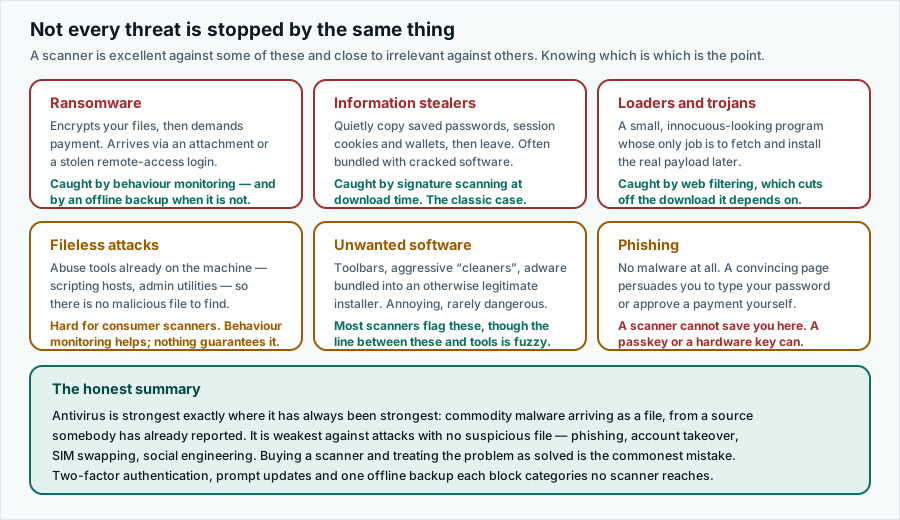
The short version: if your worry is a cracked installer carrying an information stealer, a scanner is exactly the right tool. If your worry is someone talking you into approving a payment, or a phishing page harvesting the password you reuse everywhere, a scanner is close to irrelevant and a password manager plus two-factor authentication is the actual answer.
How the scanner reaches a verdict
A real-time scanner is not one test but a short pipeline of increasingly expensive ones. Cheap and certain checks run first so that most files are cleared without touching the slow stages.
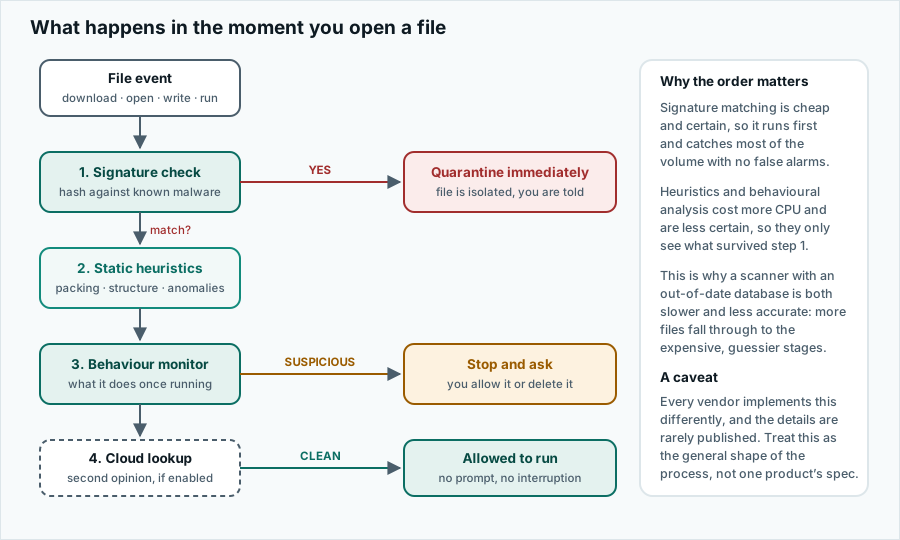
Two consequences fall out of this diagram. First, an out-of-date signature database makes a scanner both slower and less accurate, because more files fall through to the guessy, CPU-hungry stages. Second, the behavioural stage is the only one with any chance against genuinely novel malware, and it is also the stage that produces false alarms. A vendor that tunes it aggressively catches more and annoys you more. There is no setting that gives you both.
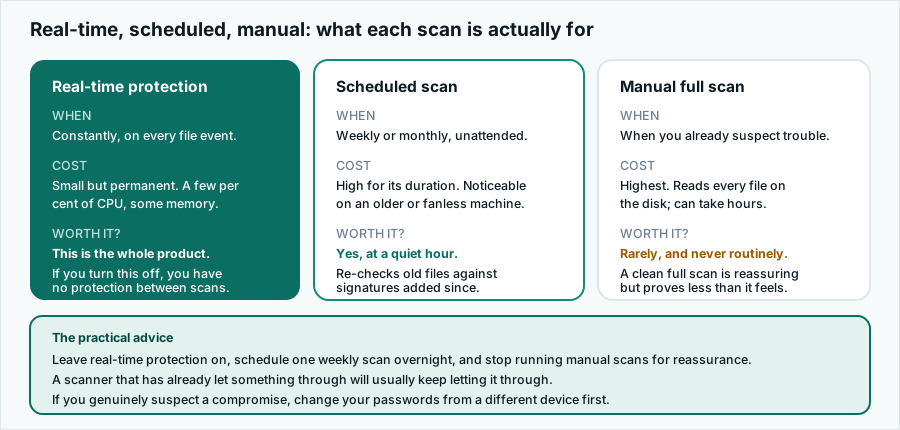
Surfshark’s scanner also offers scheduled scans and an alert when an application requests webcam access. Those are conventional features and they work as you would expect.
What comes in the box
Because the scanner is sold only as part of a bundle, the honest way to assess it is to assess the bundle. At the time of writing it contains four things.
The VPN
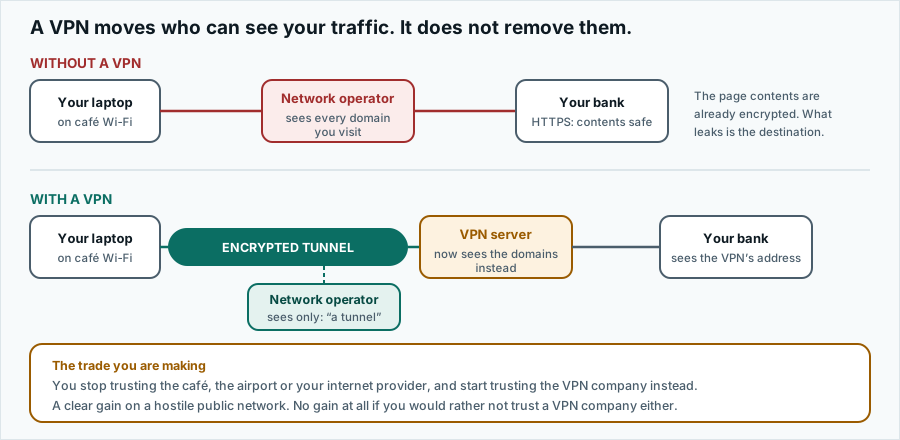
The original product and the most mature part. Encrypted tunnel, a large server list, and an option that filters ads and tracker domains at the DNS level. Notably, Surfshark permits unlimited simultaneous connections on one account, which is unusual and genuinely useful for a household.
The antivirus
Real-time file scanning, scheduled scans, webcam access alerts. Windows, macOS and Android only.
Breach alerts
Tells you when an email address or payment card you have registered turns up in a published data leak. Useful, and broadly the same service several free tools offer.
Private search
A search front end that does not build an advertising profile from your queries. Pleasant; unlikely to be why anyone subscribes.
The higher tier adds a data-removal service that files deletion requests with data brokers on your behalf. That service is also sold separately, so if it is the thing you actually want, compare the bundle price against buying it alone.
Which of your devices it covers
Correction to an earlier version of this page
An earlier version of this article stated that the antivirus covers “Windows, macOS, Android and iOS”. That was wrong. There is no iPhone or iPad malware scanner in this product, and there is no real one from any vendor, because iOS does not let an app inspect another app’s files. The claim has been removed and this note left in its place.
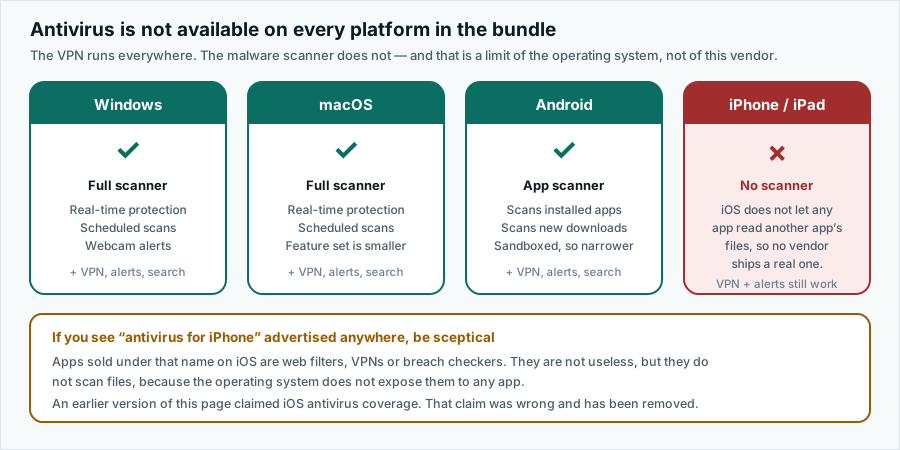
| Platform | Malware scanner | VPN | Notes |
|---|---|---|---|
| Windows | Yes | Yes | The fullest feature set, including webcam alerts. |
| macOS | Yes | Yes | Scanner present; fewer options than on Windows. |
| Android | Yes | Yes | Scans installed apps and new downloads within the sandbox the OS allows. |
| iOS / iPadOS | No | Yes | No scanner exists. VPN, breach alerts and search do work. |
| Linux | No | Yes | VPN client available; no antivirus component. |
| Browser extensions | No | Partial | Extensions provide proxying and filtering, not file scanning. |
Independent lab testing: what we could verify
This is where a normal review would print a detection-rate percentage. We are not going to, because we could not source one honestly.
The two organisations whose consumer antivirus testing is generally treated as authoritative are AV-TEST and AV-Comparatives. At the time of writing we could not find a current Surfshark entry in their published consumer comparatives. That is not evidence that the product detects poorly. Participation in those programmes is voluntary and paid for by the vendor, and plenty of competent products sit them out. But it does mean there is no independently measured detection figure we can put in front of you, and we are not going to substitute a number of our own invention or reprint one from a review site that did.
If a laboratory-verified detection rate is what would decide your purchase, check av-test.org and av-comparatives.org directly for the current tables before you buy. Those are direct links, not partner links.
For the same reason we do not name the detection engine. Bundled consumer antivirus products commonly license a third-party engine rather than building one, and various write-ups name a specific licensor for this one. We could not confirm it from a primary vendor source, so we leave it unstated rather than repeat it as fact.
Performance and system impact
Any real-time scanner costs something. It hooks file operations, so every read and write carries a little extra work, and the process sits resident in memory. On a modern machine with an SSD this is usually invisible outside of benchmarks. On an older laptop, a fanless tablet, or during a scheduled full scan, it is not.
We are describing the general behaviour of the category here rather than publishing measurements of our own. We have not run controlled benchmarks on this product, and we are not going to imply that we have. If system impact is your deciding factor, AV-Comparatives publishes a dedicated performance test that measures it properly across the products that participate.
Two practical points that hold regardless of vendor: schedule the weekly scan for an hour when you are not using the machine, and do not run two real-time scanners at once. Two resident scanners will fight over the same file hooks, and the result is a slow machine rather than a doubly-protected one. Installing a third-party scanner on Windows generally causes Microsoft Defender to stand down automatically, which is the correct behaviour.
The privacy claims, examined
Surfshark advertises a no-logs policy for its VPN and has commissioned external audits of it. That is more than many providers do and it is worth something. It is also worth being precise about what an audit of this kind establishes: an auditor examines configuration and process at a point in time. It is a meaningful signal, not a mathematical proof, and it is not a guarantee about future behaviour.
Separately, the scanner itself necessarily processes information about files on your device in order to do its job, and may send file metadata or hashes to the vendor for cloud lookups. That is how every cloud-assisted scanner works. What matters is what the vendor says it retains and for how long, and the authoritative statement of that is the vendor’s own privacy policy, not ours.
What we do on this site
Since we are discussing other people’s data handling: this website sets no cookies, runs no analytics, loads no fonts or scripts from any third party, and writes nothing to your browser’s storage. That is why there is no consent banner here — there is nothing to consent to. Here is how to check that for yourself in about thirty seconds.
Pricing and the refund window
We do not print prices. Subscription pricing for this category varies by contract length, currency, country and whatever promotion is running on the day, and a figure typed into an article in September is usually wrong by November. Quoting a stale price would be worse than quoting none.
What is stable enough to describe: pricing is tiered by commitment, with the longest term carrying the lowest effective monthly rate and the largest up-front payment; the introductory rate applies to the first term only and renewal is at a higher standard rate; and Surfshark advertises a 30-day money-back guarantee. Read the current terms for what that guarantee actually covers before relying on it — refund conditions are set by the vendor and can differ depending on where and how you bought.
Separately from any vendor guarantee, EU and Czech consumer law gives consumers a statutory right of withdrawal on distance contracts, with specific rules for digital services. Your statutory rights sit alongside the vendor’s commercial guarantee and are not replaced by it.
Who it suits — and who should skip it
Good fit
You wanted a VPN anyway. You have several Windows, Mac or Android devices in the house. You prefer one subscription and one app to four. You want a managed alternative to the built-in tool without configuring anything.
Poor fit
You are an iPhone-and-iPad household — you would be buying a VPN. You only want a scanner and have no use for a VPN. You need laboratory-certified detection figures for a compliance requirement. You are protecting a business network rather than personal devices.
There is also a category of user for whom the answer is simply nothing: someone on an up-to-date Mac or Windows machine who installs software only from the official store, uses a password manager and has two-factor authentication switched on everywhere. The built-in protection is genuinely adequate for that person, and we would rather say so than pretend otherwise.
The protection you already have for free
A review that does not mention the free option is not a review, it is an advertisement. So:
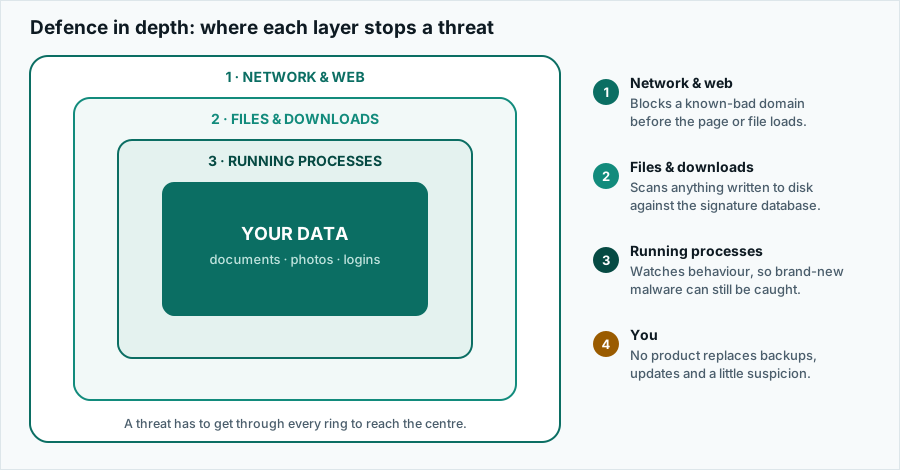
- Microsoft Defender Antivirus is built into Windows, costs nothing, requires no setup and has performed well in public laboratory testing in recent years.
- Gatekeeper, notarisation and XProtect are built into macOS and block unsigned and known-bad software without an install.
- Google Play Protect scans Android apps at install and periodically thereafter.
- A password manager and two-factor authentication — free in every browser and from several open-source projects — block the phishing and credential-stuffing attacks that no scanner touches.
- An offline or versioned backup is the only thing that reliably defeats ransomware once it has run. Nothing you can buy replaces it.
If you do all five of those, a paid scanner is a modest addition. If you do none of them, a paid scanner is the least effective place to start.
Verdict
Surfshark One is a reasonable bundle for a household that wanted a VPN and would like the malware scanning, breach alerts and search tools thrown in under one subscription and one login. The unlimited device allowance is a real differentiator. The apps are clean and the scanner does the conventional things competently.
It is not the right purchase for someone who wants a best-in-class standalone antivirus, because it is not sold as one and there is no published independent detection figure to hold it to. It is not the right purchase for an iOS household, because the antivirus does not exist there. And it is not a substitute for updates, backups and two-factor authentication, none of which cost anything.
We deliberately do not award a score out of ten. A single number would compress all of the above into something that looks objective and is not.
What we corrected in this article
This page replaces an earlier version. In the interest of being straightforward about it, these are the substantive claims that were changed and why:
- “Covers Windows, macOS, Android and iOS.” Removed. There is no iOS malware scanner in this product and no genuine one from any vendor.
- “Your antivirus subscription already includes a VPN.” Reversed. It is a VPN subscription that includes an antivirus, and the antivirus is not sold separately.
- “A few euros per month.” Removed. We no longer quote prices, which vary by term, country and promotion.
- “Real-world data consistently shows…” Removed. No source was cited and the comparable figures do not exist.
- “Reader Stories” / “reader-submitted story”. Removed entirely. Nothing on this site was submitted by a reader; that framing was misleading and there are now no testimonials, star ratings or user reviews anywhere on the site.
- “Checks all of them, and then adds a few extras.” Removed. The original checklist was written so that the product could not fail it.
- Unqualified “no-logs” and “30-day guarantee” claims. Now attributed to the vendor and pointed at the vendor’s current terms.
Sources
Everything above that is a matter of fact rather than opinion can be checked against these. None of them are partner links; none of them earn us anything.
- Surfshark — product and plan pages: surfshark.com/antivirus and surfshark.com/one. The authoritative source for features, platform support, pricing and plan contents.
- Surfshark — terms of service and refund conditions: surfshark.com/terms-of-service.
- Surfshark — privacy policy, for what the apps collect and retain: surfshark.com/privacy.
- AV-TEST Institute, independent consumer antivirus testing: av-test.org.
- AV-Comparatives, independent detection and performance testing: av-comparatives.org.
- ENISA, EU Agency for Cybersecurity — threat landscape reporting: enisa.europa.eu.
- Microsoft, on the security built into Windows: learn.microsoft.com.
- Apple Platform Security guide, on Gatekeeper, notarisation and XProtect: support.apple.com.
- Google, on Play Protect: developers.google.com.
Where this article and the vendor disagree
Product specifications, platform support, plan contents, pricing and refund terms are set by the advertiser and change without notice. This article was accurate to the best of our knowledge on . Where anything here differs from the vendor’s own current information, the vendor’s information prevails. If you find an error, tell us at info@pravia.online and read how we handle it in our corrections procedure.
Trademarks
pravia.online is an independent publication. It is not affiliated with, endorsed by, sponsored by or otherwise connected to Surfshark B.V., Nord Security, Microsoft, Apple, Google or any other company named on this site. “Surfshark” and all other product and company names, logos and brands are the property of their respective owners and are used here for identification and descriptive purposes only.