How antivirus software actually works
Signatures, heuristics, behavioural monitoring and cloud lookups — what each one does, why they run in that order, and why no combination of them is a guarantee.
Advertising disclosure
This article contains paid partner links, marked “Partner link”. If you subscribe after following one, ASSURITY s.r.o. is paid a commission by the advertiser. You pay the same price you would pay going direct. Commission does not buy a favourable verdict: nobody outside this site reads or approves an article before publication, and the drawbacks below were not cleared with anyone. Our editorial policy sets out the rules we work to.
This page is deliberately product-free. If you understand the mechanism, you can evaluate any vendor’s marketing yourself, including the vendor we are paid to advertise.
The scanning pipeline
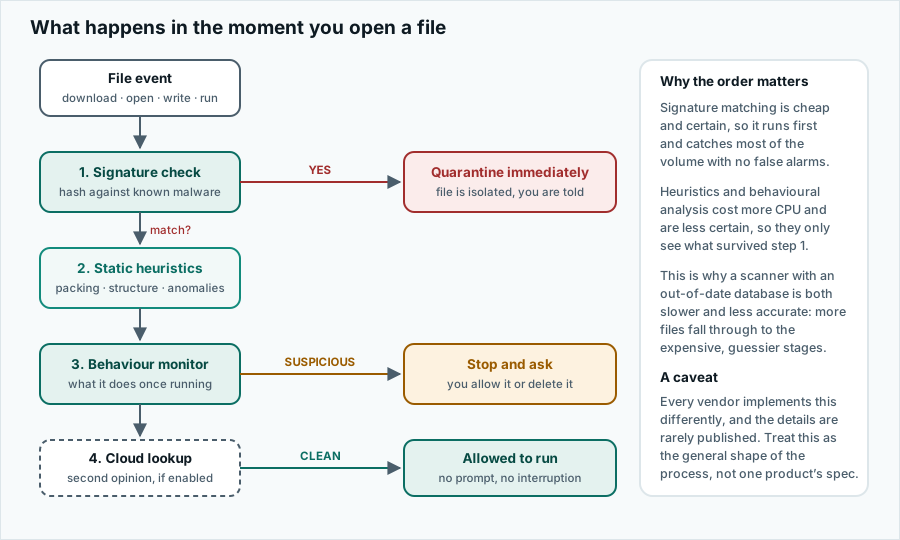
A resident scanner hooks into the operating system so that it is notified whenever a file is created, written, opened or executed. At each of those moments it has a few milliseconds to decide whether to allow the operation. It cannot afford to run every test on every file, so it runs them in ascending order of cost.
Signatures: the cheap, certain test
The oldest technique and still the workhorse. The scanner computes a hash of the file, or looks for a distinctive byte pattern inside it, and compares that against a database of known malware. A match is effectively certain, which is why a signature hit triggers immediate quarantine with no prompt.
The limitation is obvious: it only recognises what has already been reported and catalogued. Change one byte in a malicious executable and its hash changes entirely. Modern malware families do this automatically on every distribution, which is why signature databases are enormous and updated many times a day rather than weekly.
The practical implication for you: an antivirus that cannot reach its update server is much closer to useless than it looks. If the app reports that definitions are days old, that is not a cosmetic warning.
Static heuristics: reading the file without running it
When there is no signature match, the scanner inspects the structure of the file itself. Is the executable packed or obfuscated in a way legitimate software rarely is? Does it import the specific combination of system functions that keyloggers use? Is a document carrying a macro that immediately downloads and executes something?
None of these are proof. Legitimate software is sometimes packed, and plenty of honest programs read the keyboard. Heuristics produce a score, not a verdict, and the vendor picks the threshold at which that score becomes an alert. That threshold is a business decision as much as a technical one.
Behavioural monitoring: watching what it does
The only stage with a real chance against malware nobody has seen before. Instead of asking what the file is, the scanner watches what the process does once it starts running, and looks for sequences that only make sense if something is wrong.
- Enumerating the user’s documents and rewriting each one in place — the ransomware signature behaviour.
- Reading a browser’s saved-password store and then opening a network connection.
- Writing itself into a startup location and deleting the original.
- Disabling the system’s own recovery snapshots, which nothing legitimate does unprompted.
- Injecting code into another running process.
The catch is that by the time behaviour is observable, the program is already running. Behavioural detection is therefore always a race: the goal is to stop it after the first few encrypted files rather than after all of them. Some products pair this with an automatic rollback of the changes made in the seconds before detection.
Cloud lookups: borrowing everyone else’s experience
When a scanner is unsure, it can send a hash of the file — or in some configurations the file itself — to the vendor’s servers for a verdict informed by everything the vendor has seen across its whole user base. A file first observed twenty minutes ago on six machines worldwide is suspicious in a way that a file present on forty million machines for three years is not.
This is genuinely effective and it is also the part with the clearest privacy cost. Every cloud-assisted scanner sends something about your files to its vendor. Read the vendor’s privacy policy for what exactly, and whether it can be switched off.
False positives, and why they matter more than you think
A scanner tuned to catch everything will also flag things that are fine. This is not a minor annoyance. A false positive on a system file can break the operating system; a false positive on a build artefact can stop a developer working; and, worst of all, a user who is prompted five times a week learns to click “allow” without reading. That habit is far more dangerous than the malware the prompt was protecting against.
This is why the reputable testing laboratories weight false-positive rates alongside detection rates. A product that detects 99.9 per cent of threats and flags dozens of clean files is worse in practice than one that detects 99.5 per cent cleanly.
Real-time, scheduled and manual scans
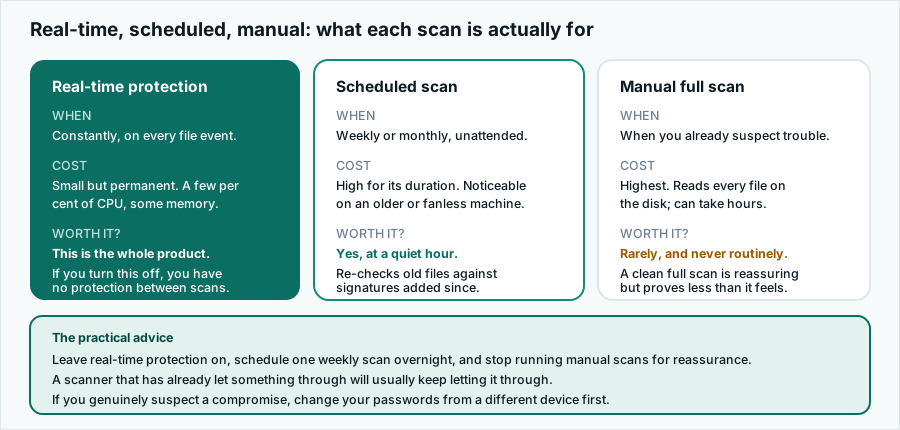
The one rule worth remembering: never disable real-time protection “temporarily” to make an installer work. That instruction appears in the readme of a great deal of malware, and in the readme of almost nothing legitimate.
What none of it can do
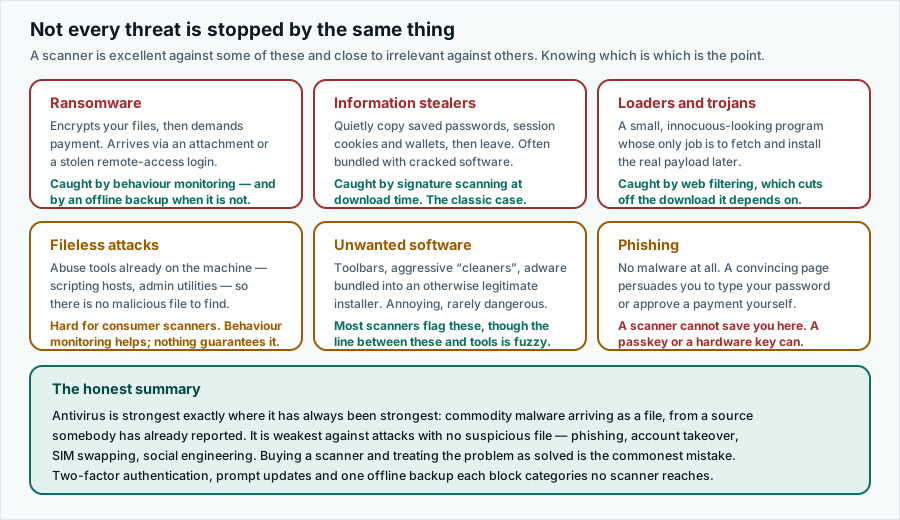
A scanner inspects files and processes on a device. It therefore has essentially nothing to say about:
- A phishing page that convinces you to type your own password.
- An attacker who already has your password because it leaked from somewhere else and you reused it.
- A fraudulent payment you authorise yourself after a persuasive phone call.
- A breach at a company holding your data, which happens entirely off your device.
- A SIM swap that redirects your SMS codes.
Which is the argument for the short list of habits that do cover those — and the reason we would rather you read that page than this one, if you only read one.
Accuracy and trademarks
Written by Jennifer Bell and published on . Product details change without notice; where anything here differs from the vendor’s own current information, the vendor’s information prevails. Corrections to info@pravia.online — see our corrections procedure.
pravia.online is an independent publication. It is not affiliated with, endorsed by, sponsored by or otherwise connected to Surfshark B.V., Nord Security, Microsoft, Apple, Google or any other company named on this site. “Surfshark” and all other product and company names, logos and brands are the property of their respective owners and are used here for identification and descriptive purposes only.