Surfshark Antivirus: the feature list, feature by feature
What each advertised feature actually does, how much it is worth, and which ones duplicate something your operating system already gives you.
Advertising disclosure
This article contains paid partner links, marked “Partner link”. If you subscribe after following one, ASSURITY s.r.o. is paid a commission by the advertiser. You pay the same price you would pay going direct. Commission does not buy a favourable verdict: nobody outside this site reads or approves an article before publication, and the drawbacks below were not cleared with anyone. Our editorial policy sets out the rules we work to.
A feature list is only useful if somebody tells you which entries matter. This one goes through them in order and marks each as genuinely useful, duplicated by something free, or largely cosmetic.
Real-time protection Core
The resident scanner. It hooks file operations and checks anything written, opened or executed against the signature database, then against heuristic and behavioural rules. This is the feature. Everything else on this page is an accessory to it.
Available on Windows, macOS and Android. Not available on iOS or iPadOS, where the operating system does not permit it. How the mechanism works.
Worth it? Yes, but note that Windows and macOS both ship an equivalent at no cost. The value of a third-party scanner is a second vendor’s judgement and a single management interface, not protection where there was none.
Scheduled and on-demand scanning Core
Full-disk and targeted scans, either on a timer or when you ask. The point of a scheduled scan is not to find what real-time protection missed today; it is to re-examine files that were already on the disk against signatures added since they arrived.
Worth it? Yes, once a week, overnight. Running one daily costs you performance and buys you very little.
Webcam access alerts Useful
Notifies you when an application requests the camera. Worth having, with the caveat that both Windows and macOS already show a hardware indicator light and a system-level permission prompt for camera access. This is a third notification of something you were going to be told about anyway.
Worth it? Mildly. Do not let it be the reason you subscribe.
Ad and tracker filtering Part of the VPN
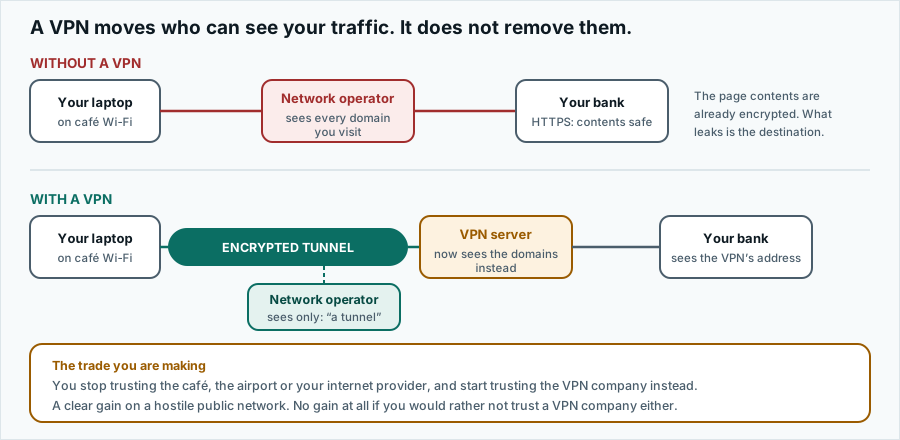
Worth being precise here, because marketing tends to blur it: this is a function of the VPN component, not the antivirus. It filters requests to known advertising and tracking domains, typically at the DNS level, which also blocks a proportion of malware-distribution domains as a side effect.
DNS-level filtering is a blunter instrument than a browser content blocker — it cannot remove an element from a page, only refuse to resolve a hostname — but it works across every application on the device, not just the browser, and it costs no browser memory.
Worth it? Yes, and it pairs well with a browser-based blocker rather than replacing one.
Breach alerts Useful
You register email addresses, and in some configurations payment cards or identity documents, and the service tells you when one appears in a published breach dataset. This is genuinely useful — credential reuse after a breach is one of the most common ways ordinary accounts get taken over.
It is also a service several free tools provide, and your password manager or browser may already be doing it without you noticing. Check before valuing it highly.
Private search Cosmetic
A search front end that does not build an advertising profile from your queries. Pleasant. Several free search engines offer the same proposition. This is unlikely to be anybody’s deciding factor and we would not present it as one.
Features it does not have
A fair review names the gaps. At the time of writing the bundle does not include:
- A password manager. Some competing suites bundle one. This does not.
- A firewall. You are relying on the operating system’s, which for most home users is fine.
- Parental controls or content filtering by category.
- Encrypted cloud backup. Several rival suites include storage; this does not, and as noted elsewhere a backup is the one thing that reliably defeats ransomware.
- Any antivirus at all on iOS or iPadOS. See device support.
- A published independent detection score. We could not find a current AV-TEST or AV-Comparatives entry for this product.
The summary table
| Feature | Component | Already free? | Our take |
|---|---|---|---|
| Real-time malware scanning | Antivirus | Yes, on Windows and macOS | The core of the product. A second opinion rather than a first line. |
| Scheduled scans | Antivirus | Yes | Useful weekly, pointless daily. |
| Webcam alerts | Antivirus | Partly | The OS already warns you. Minor addition. |
| Encrypted VPN tunnel | VPN | No | The strongest part of the bundle. Unlimited simultaneous devices is unusual. |
| Ad and tracker filtering | VPN | Partly | Device-wide, which a browser extension is not. |
| Breach alerts | Alert | Yes | Genuinely useful; widely available free. |
| Private search | Search | Yes | Nice. Not a reason to buy. |
| Data broker removal | Higher tier | No | Real work, real value — but also sold separately. Compare. |
Accuracy and trademarks
Written by Jennifer Bell and published on . Product details change without notice; where anything here differs from the vendor’s own current information, the vendor’s information prevails. Corrections to info@pravia.online — see our corrections procedure.
pravia.online is an independent publication. It is not affiliated with, endorsed by, sponsored by or otherwise connected to Surfshark B.V., Nord Security, Microsoft, Apple, Google or any other company named on this site. “Surfshark” and all other product and company names, logos and brands are the property of their respective owners and are used here for identification and descriptive purposes only.