Device support: where the scanner runs, and where it does not
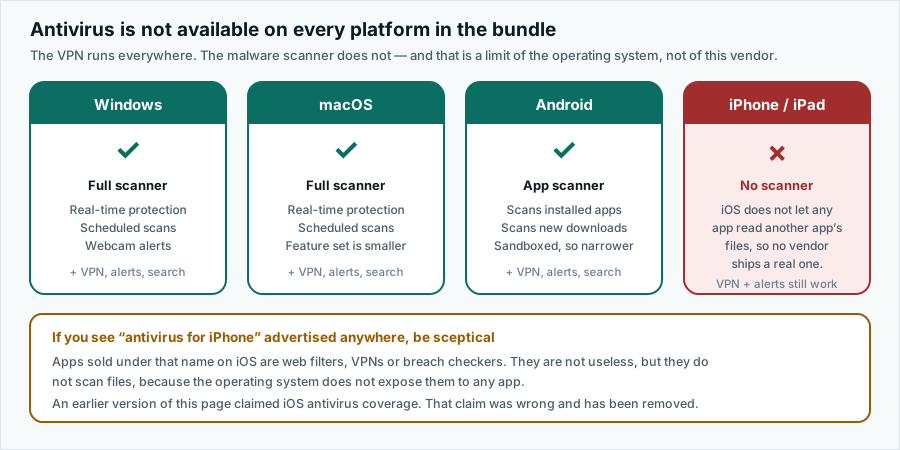
The VPN runs on everything. The malware scanner runs on three platforms. If your household is built on iPhones and iPads, you need to know that before you subscribe.
Advertising disclosure
This article contains paid partner links, marked “Partner link”. If you subscribe after following one, ASSURITY s.r.o. is paid a commission by the advertiser. You pay the same price you would pay going direct. Commission does not buy a favourable verdict: nobody outside this site reads or approves an article before publication, and the drawbacks below were not cleared with anyone. Our editorial policy sets out the rules we work to.
The one-line summary
Malware scanner: Windows, macOS, Android. VPN and the other tools: everywhere, including iOS.
Windows
The fullest implementation: resident real-time protection, scheduled and on-demand scans, quarantine management and webcam access alerts.
Worth knowing: Windows already includes Microsoft Defender Antivirus, which has performed well in public laboratory testing in recent years. Installing a third-party real-time scanner normally causes Defender to stand down to passive mode automatically. This is correct and desirable — two resident scanners competing for the same file hooks will slow the machine without making it safer. Do not try to force both to stay active.
macOS
Real-time and scheduled scanning are present. The feature set is smaller than on Windows, which is normal across the whole category: macOS restricts what a third-party security tool can hook into, and it already runs Gatekeeper, notarisation checks and the XProtect signature system underneath.
You will be asked to grant the app full-disk access during setup. That is a genuine requirement for a scanner — it cannot examine files it cannot read — and it is also a significant permission. Grant it knowingly.
Android
Scans applications at install time and periodically afterwards, and scans files you download. Android sandboxes applications from one another, so an Android scanner is necessarily narrower than a desktop one: it can examine app packages and files in shared storage, not the private data of other apps.
Google Play Protect already performs a similar scan on apps from the Play Store. A third-party scanner is most useful if you install applications from outside the Play Store, which is also the situation in which most Android malware is actually encountered.
iPhone and iPad
There is no antivirus here. From anyone.
The Surfshark bundle’s iOS app provides the VPN, breach alerts and search. It does not provide malware scanning, and no honest product does on this platform.
If you are buying the bundle for an iOS-only household, you are buying a VPN subscription. That may still be a perfectly sensible purchase — but buy it for the reason that is true.
Linux and everything else
A VPN client is available for Linux; there is no antivirus component for it. Router-level and smart-TV configurations are a VPN matter only. Browser extensions provide proxying and filtering, not file scanning; an extension cannot scan your disk and should never be described as antivirus.
Why no iOS antivirus exists
This is a property of the operating system, and it is worth understanding because it immunises you against a whole genre of misleading App Store listings.
iOS runs every application inside a sandbox. An app can read its own container and whatever the user explicitly hands it through a system picker. It cannot enumerate the filesystem, cannot read another app’s data, and cannot inspect or intercept another process. A scanner needs precisely those abilities. The platform does not grant them to anyone, so nobody ships a real one.
What the products marketed as “antivirus for iPhone” actually contain is some combination of a VPN, a DNS or web content filter, a breach-database lookup, and a Wi-Fi network checker. Those are not worthless. They are just not antivirus, and a listing that calls them antivirus is misleading you.
Apple’s own controls do the malware job instead: applications are reviewed before distribution, code is signed, and the system will refuse to launch software that fails those checks. The realistic threats to an iPhone are phishing, account takeover and physical access — none of which a scanner would address anyway.
Working out what you need
Count your devices into three columns before you decide:
| You own | Scanner | VPN | What the subscription gives you |
|---|---|---|---|
| Windows PC | Yes | Yes | Everything. |
| MacBook | Yes | Yes | Everything, slightly fewer options. |
| Android phone or tablet | Yes | Yes | App scanning plus the VPN. |
| iPhone or iPad | No | Yes | VPN, alerts and search only. |
| Linux desktop | No | Yes | VPN only. |
| Smart TV, console, router | No | Via router or app | VPN only, where supported. |
If the scanner column is empty for every device you own, the honest conclusion is that you are shopping for a VPN, and you should compare VPNs on VPN criteria.
Accuracy and trademarks
Written by Jennifer Bell and published on . Product details change without notice; where anything here differs from the vendor’s own current information, the vendor’s information prevails. Corrections to info@pravia.online — see our corrections procedure.
pravia.online is an independent publication. It is not affiliated with, endorsed by, sponsored by or otherwise connected to Surfshark B.V., Nord Security, Microsoft, Apple, Google or any other company named on this site. “Surfshark” and all other product and company names, logos and brands are the property of their respective owners and are used here for identification and descriptive purposes only.